Tuesday, February 28, 2012

Extension - Screen Capture (by Google)


We have been using this tool this tool on all of our blogs to capture images for our posts. It is easy to use this extension to capture visible content of a tab, a region of a web page, or the whole page as a PNG image.

You can also edit your captured image before saving it as a PNG image. Highlighting, redacting and adding text are supported.

- Super fast when capturing page image, esp. for large pages
- Support horizontal scroll for large pages that do not fit in one tab screen horizontally
- Intelligently detect floating objects on a page and avoid repeating capture of the same floating objects if whole page capture requires scrolling

Download it from the Chrome Web Store today.

Saturday, February 25, 2012

App - Need Office?


So you are a Chromebook users who misses Office. Access MS Office apps online from Chrome with one click! No Office install needed! Sure, Google Docs is great, but for sometimes you need the real deal.You can make Word, Excel, Powerpoint, and OneNote documents right from inside Chrome completely web based and stored on the net. Located in the Chrome Web Store.

Pros and Cons of the Google Chromebook - Samsung Series 5


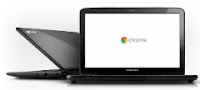
Our team has been running the Samsung Chromebook Series 5 for a few months now and have really enjoyed the device. Samsung is offering the Series 5 in the US at $429.99 for the WiFi-only and $499.99 for the 3G version. The Series 5 offers many features of a laptop or notebook(minus the CD drive) with the unique functionality and style of a netbook. The thin form factor offers up a perfect sized 12.1-inch 16:10 display. We appreciate that Samsung has used one of its SuperBright LED panels, running at 1280 x 800. The non-gloss panel not only offers great colors, but makes it easy to use without reflections indoors and out. The lid also has 1-megapixel webcam for pictures and videos. The thin chassis only weighs just over 3lbs, so it's great "on the go" device. So let's take a look at the Pros and Cons of the Chromebook and the operating system.


Pros
-

* Fast
The Chromebook boots up in about of eight seconds. Also, because the OS operates through a web browser, performance is also speedy.

*Protected/Worry Free
The Chromebook runs a Linux kernel for running processes. This also means users don’t have to worry about viruses.

*Automatically Updates
Each time the Chromebook is started, the system will check and download any updates. It will also fix any previous issues during the last use.

*Solid-State Storage
The Chromebook offers no moving parts, not even a spinning hard drive. The Chromebook comes with a 16Gig solid state flash drive.

*Long-Life Battery
Because the Chromebook runs on a very light diet of applications, it really and doesn't consume much battery life. Average users will see at least six to eight hours.

*Lightweight
The Chromebook weighs only three pounds. Not bad for stow and go.

*Wireless Broadband (Optional)
You can connect to the Internet via Wi-Fi, or tap into the Verizon 3G or 4G network. This may be a necessity for those on the go needing access to files.

*Automatically Updated
You don’t have to worry about downloading updates because Chromebook will do it automatically upon restart.

*Easy to Use
Since it is basically just an Internet browser, the Chromebook is very user-friendly and easy for everyone to use.

*Quick and Painless Recovery (Updated 2.18,13)
(See our February 18th post...we love our Chromebook even more)


Cons -


*Requires Internet Connection
Because everything is stored and operates in the cloud (Internet) rather than on the actual device, if your Chromebook is not connected to the Internet you won’t be able to access any of your files.

*Compatibility
You can’t run any Windows or Apple applications on the Chrome OS. Additional programs must be downloaded as Apps or Plugins.

*Cloud Storage
All data/file will be stored on Google’s cloud. Once again that means you will need an Internet connection to access this information.

*Cost
The Google Chromebook starts at $349 and goes up from there depending on the features. This is significant investment for a device that relies so heavily on an Internet connection for its use. It may be worth it if you just need a device to access the Internet for research, blogging or communication.

Sunday, February 19, 2012

Change, Disable Keyboard Functions

You have probably noticed that Cap Lock key has become the Google Search key. Some have complained that they accidentally keep hitting this key and jumping to another page while typing, This key can be changed back to Cap Lock function or something else. Go to Wrench icon > Settinngs > System > Modifier keys. Change Search to some other function, or even disabling it.

Sunday, January 29, 2012

cromebook Tip - Try Another Flavor

Google is constantly updating and upgrading the chrome OS. This can be great entertainment if your are like us,,,and get board easily. If you weren't aware, every time the chromebook is restarted, it goes out an checks for a more current version. It also does a self-repair and cleans up the OS. If you are adventurous, you can change the operating system from the the stable version to the beta and development version. Here are the steps to move outside of your comfort zone.
1 - Go to the wrench in the upper right hand corner
2 - Go to About Crome OS
3 - A window will appear listing the current version of the OS you are runnning
4 - Click on More Infor and look for the pull down window.
5 - Select the version you would like to try - stable, beta and development
6 - Restart your computer and wait for the update

Have some fun and try a new flavor or Chrome!!

Friday, January 27, 2012

Exploring chromebooks Apps and Extensions

What make the chromebook different from a traditional laptop is that it uses Apps and Extensions instead of the traditional program. Watch this Google webcast to learn more about these features.

chromebook Benefits


Our team here at the chromebook nation have put together a list of benefits for the chromebook. So kick back and enjoy.

1. Small form factor makes it easy to stow
2. So light you don't even know your carrying it
3. So far it has a long battery life, sure beats our iPhone
4. Quick 8 second boot-up
5. OS refreshed and corrects any system issues upon boot-up
6. Solid state hard drive makes it more durable and take those accidental bumps
7. Extremely bright screen
8. No virus protection needed...at least that is what Google told us
9. Built in webcam...everyone needs a webcam
10. Quick install apps from the Google app store

chromebook Overview

What is a chromebook?


A chromebook is an ulta-light laptop running Google chrome OS. What makes it unique compared to the traditional laptop is that is mostly a cloud based system. Currently all netbooks run on the atom processor and are manufactured by Samsung and Acer.